
You publish a new article, check Google Search Console and discover that Google has crawled the page. You publish another, and Google crawls that one too. Yet when you check your website analytics, the number of visitors coming from Google remains disappointingly low.
This can be confusing, especially when you have invested time in writing articles, improving your website and submitting your sitemap. You may begin to wonder whether Google is ignoring your website or whether something is wrong with your SEO.
The problem is that Google crawling your website and Google sending visitors to it are two different things. Understanding the difference can help you identify what is actually preventing your content from attracting search traffic.
1. Crawling Does Not Mean Google Has Accepted Your Page Into Its Index
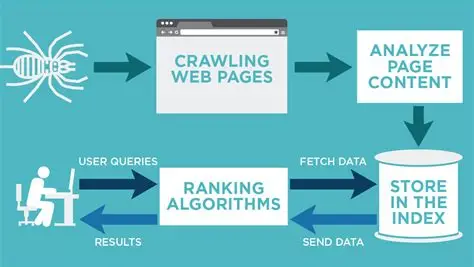
Crawling happens when Google’s automated systems visit a URL and retrieve its content. This allows Google to discover what is on the page and process it for possible inclusion in its search index.
However, crawling is only the first step. Google can crawl a page without indexing it, meaning the page may not become eligible to appear in ordinary Google Search results.
For example, imagine you publish an article about undergraduate scholarships without IELTS. Googlebot visits the page, reads its content and records the crawl. But that does not guarantee the article will appear when someone searches for scholarships.
Google evaluates pages before deciding whether to include them in its index. Duplicate content, technical problems, weak internal linking and content that offers limited additional value can all contribute to indexing difficulties.
You can check the URL Inspection tool in Search Console to see whether an individual page is indexed and investigate any reported issues. Google also explains these processes in its official crawling and indexing guide.
2. Being Indexed Does Not Mean You Will Rank Well
Suppose Google has indexed 500 articles on your website. That sounds encouraging, but it does not mean all 500 articles will appear prominently when people search for relevant topics.
Indexing makes a page eligible to appear in search results. Ranking determines where Google places it for a particular search, depending on relevance, quality and many other factors.
Imagine your article targets the phrase “how to make money online in Nigeria”. Even if Google indexes it, you may be competing against established websites with stronger reputations, more relevant content and extensive coverage of the subject.
Your article could appear far down the results, where relatively few people will encounter it. Alternatively, it may appear for related searches that attract very little traffic.
This explains why a website can have hundreds of indexed pages but receive only a small number of visitors from Google. The problem may not be crawling or indexing at all. It may be the positions those pages achieve in search results.
3. Your Articles May Target Searches That Few People Make
This is an important issue that website owners sometimes overlook.
You can write a useful, original article and optimise it properly, yet receive almost no search traffic because relatively few people search for the topic or phrase you have chosen.
For example, an article titled “How Small Nigerian Businesses Can Organise Their Daily Cash Records” may offer practical advice. However, the exact wording may not match the language potential readers use when searching for help.
People might instead search for how to record daily sales, how to track business expenses or how to calculate daily profit.
The solution is not to abandon specialised topics. It is to investigate how people describe their problems and whether your content addresses those problems in language they recognise.
Google Search Console can reveal the actual queries generating impressions for your pages. You can also use keyword research tools to investigate related searches, although their search volume estimates are not exact counts of future visitors.
4. Check Whether Google Is Showing Your Pages to Searchers
One of the most useful ways to diagnose low traffic is to examine impressions, clicks and average position in Google Search Console.
These measurements tell you different things.
| Search Console metric | What it tells you |
|---|---|
| Impressions | How often your pages appeared in eligible Google search results |
| Clicks | How often people clicked through from those results |
| Average position | The average position of your site’s results across the measured searches |
| Click through rate | The proportion of impressions that resulted in clicks |
If your pages are indexed but receive almost no impressions, investigate whether they rank for relevant queries, whether people search for those topics and whether Google understands the purpose of the pages.
If impressions are increasing but clicks remain low, examine the queries, positions and search result presentation. Your titles may not communicate the value of the article clearly, or your pages may appear for searches that do not closely match the content.
If a page receives impressions and clicks but visitors leave quickly, investigate whether the article delivers what the searcher expected. The answer may involve content quality or usability rather than crawling.
Google provides an explanation of these measurements in its Search Console performance report documentation.
5. Too Many Similar Pages Can Complicate Your SEO
Publishing more articles does not automatically produce more visitors.
Consider a website with separate articles titled “Best Scholarships Without IELTS”, “Undergraduate Scholarships Without IELTS” and “Scholarships You Can Apply for Without IELTS”. If all three cover almost identical opportunities and answer essentially the same questions, they may compete for similar searches without offering enough distinct value.
This is not a rule that similar topics must always be combined. Separate pages can perform well when they serve genuinely different audiences or search intentions.
The problem arises when multiple URLs provide substantially overlapping information, especially if the website contains many thin category pages, automatically generated URLs or near identical articles.
Google’s guidance on crawl budget management explains why managing unnecessary URLs and duplicate content can improve crawling efficiency. Most small websites do not need to worry excessively about crawl budget, but sites with large numbers of URLs should pay attention to it.
6. What You Should Do When Google Crawls but Traffic Remains Low
Start by choosing five to ten important articles rather than attempting to fix your entire website at once.
Check their indexing status in Search Console. For indexed pages, review the Performance report to identify their queries, impressions, clicks and positions over a meaningful period.
Next, compare each article with the questions people are actually searching for. Improve pages that fail to answer the main question clearly, add original information where it is missing, and strengthen internal links from relevant articles.
Also examine whether the website has unnecessary duplicate pages or technical problems that prevent Google from accessing the content correctly. Make sure important pages are indexable and included in an understandable site structure.
Do not repeatedly request indexing for pages that Google has already crawled without first identifying a problem. Requesting another crawl does not guarantee indexing or better rankings.
Finally, give meaningful improvements time to produce results. Search visibility can change gradually, and no single SEO adjustment guarantees additional visitors.
The Real Measure Is Not How Often Google Visits
Seeing Googlebot crawl your website can be encouraging because it shows that Google is accessing your content. But crawl activity alone cannot tell you whether people want the information, whether your pages are indexed or whether they rank well enough to attract visitors.
The more useful question is what happens after Google discovers a page. Is it indexed? Does it appear for relevant searches? Are people seeing it? And when they see it, do they have a reason to click?
Once you separate these stages, you can stop treating every traffic problem as a crawling problem. Instead, you can use Search Console to identify where the process is breaking down and focus your effort on the changes most likely to improve your website’s search visibility.