
Artificial intelligence has completely changed video creation. What once required expensive cameras, professional editors, actors, and production teams can now be done from a laptop using nothing more than a text prompt or a single image.
Whether you’re a YouTuber, TikTok creator, Facebook content creator, marketer, freelancer, educator, or business owner, AI video generators can save hours of editing while helping you produce professional-looking videos at a fraction of the traditional cost.
The biggest challenge, however, isn’t choosing an AI video generator; it’s finding one that offers enough credits to create videos consistently without spending hundreds of dollars every month.
Some platforms advertise low monthly prices but provide very few credits, meaning you’ll run out after creating just a handful of videos. Others charge slightly more but include thousands of monthly credits, making them much better value over time.
This guide compares some of the best affordable AI video generators available in July 2026, including their pricing, credit allocations, features, strengths, and the type of creators they’re best suited for.
Disclaimer
The pricing, subscription plans, and credit allocations in this guide were verified in July 2026 using official pricing pages and reputable technology sources. AI companies frequently update their prices, features, and credit systems. Always check each provider’s official website before purchasing a subscription.
Why Credits Matter More Than Monthly Price
Most AI video generators don’t charge based on the number of videos you create. Instead, they use a credit system.
Each video generation consumes credits depending on factors such as:
- Video length
- Resolution
- AI model used
- Frame rate
- Native audio generation
- Camera movement
- Image-to-video versus text-to-video
This means two subscriptions that both cost $10 per month can provide dramatically different value.
For example, one service may generate only 20 videos before running out of credits, while another may allow more than 100 short videos using the same monthly budget.
Understanding this difference can save you a significant amount of money.
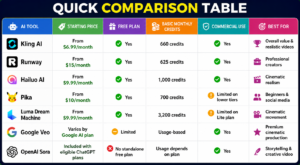
Quick Comparison Table
1. Kling AI – Best Overall Value for Most Creators
If you’re looking for the best balance between affordability, quality, and monthly credits, Kling AI is one of the strongest options available today.
Developed by Chinese technology company Kuaishou, Kling has quickly become one of the most popular AI video generators thanks to its realistic motion, impressive prompt understanding, and affordable pricing.
Current Pricing (July 2026)
Free Plan
- Free forever
- 66 credits every day
- Watermarked videos
- Standard generation speed
- Up to 720p quality
Standard Plan
- Approximately $6.99 per month
- 660 monthly credits
- Faster generation
- No watermark
- Supports videos up to 10 seconds
Pro Plan
- Approximately $25.99 per month
- 3,000 monthly credits
- Priority queue
- Better rendering quality
Premier Plan
- Approximately $64.99 per month
- 8,000 monthly credits
- Maximum priority
- Commercial licence
- Best for agencies and production teams.
How Many Videos Can You Create?
The exact number depends on the model and quality settings.
As a rough estimate:
- 660 credits can produce around 18–30 professional-quality 5–10 second videos.
- Lower-resolution settings allow significantly more generations.
- The free plan’s 66 daily credits are enough to experiment with several short clips every day.
Best Features
- Excellent text-to-video generation
- Image-to-video conversion
- Highly realistic human movement
- Lip-sync capabilities
- Strong cinematic camera motion
- Fast rendering
- High-quality lighting
Many creators consider Kling one of the best tools for realistic storytelling.
Advantages
- Excellent value for money.
- Daily free credits.
- Affordable paid plans.
- Commercial use on paid subscriptions.
- Very realistic people and environments.
- Frequent model improvements.
Disadvantages
- Credits can disappear quickly when generating longer videos.
- Some advanced features are limited to higher-tier plans.
- Rendering queues may be longer during peak hours.
Who Should Buy Kling AI?
Kling is ideal for:
- YouTube creators.
- TikTok creators.
- Facebook Reels.
- Instagram content.
- Storytelling channels.
- Marketing agencies.
- Freelancers.
- Small businesses.
For many creators, Kling offers the best balance between affordability and professional-quality results.
2. Runway – Best for Professional Video Production
Runway has become one of the most respected AI video platforms in the creative industry.
Unlike many competitors that focus only on video generation, Runway combines AI generation with professional editing tools, making it attractive to filmmakers, advertisers, and content studios.
Current Pricing (July 2026)
Free Plan
- 125 one-time credits
- Watermarked exports
- Basic features
Standard Plan
- Around $15 per month
- 625 monthly credits
- Commercial usage
- Higher-quality exports
Higher-tier plans
- Additional credits
- Faster rendering
- Collaboration tools
- Advanced AI models.
How Many Videos Can You Create?
Runway credits are consumed based on:
- Video duration.
- Resolution.
- Selected AI model.
- Advanced editing options.
Many users report that the Standard plan is sufficient for moderate monthly production but may feel restrictive for creators generating large numbers of videos every week.
Best Features
- Text-to-video.
- Image-to-video.
- Motion brush.
- Camera controls.
- Background removal.
- Lip sync.
- AI video editing.
- Green screen removal.
- Professional workflow integration.
Advantages
- Industry-leading editing features.
- Excellent visual quality.
- Commercial rights included.
- Reliable exports.
- Widely used by creative professionals.
Disadvantages
- Fewer credits than some competitors at a similar price.
- Beginners may find the interface overwhelming.
- Heavy users often need higher-tier subscriptions.
Who Should Buy Runway?
Runway is best suited for:
- Professional filmmakers.
- Advertising agencies.
- Documentary creators.
- YouTubers producing long-form content.
- Businesses creating commercial videos.
If your goal is professional production rather than simply generating lots of short clips, Runway remains one of the strongest choices available.
3. Hailuo AI – Best for Realistic Human Videos
Hailuo AI has become one of the fastest-growing AI video platforms because of its remarkable ability to generate realistic people and accurately follow prompts.
Many creators use Hailuo when they want cinematic scenes that closely match their written descriptions.
Current Pricing (July 2026)
Free Plan
- Daily login credits.
- Watermarked videos.
Basic Plan
- Around $9.99 per month
- Approximately 1,000 monthly credits
- No watermark.
- Commercial use.
Higher Plans
- Up to 4,000 monthly credits
- Faster rendering.
- Priority generation.
- Additional creative tools.
Best Features
- Exceptional prompt accuracy.
- Realistic facial expressions.
- Character reference uploads.
- Director Mode for advanced scene control.
- Voice cloning tools.
- AI chatbot integration.
Advantages
- Excellent realism.
- Strong value for money.
- Generous monthly credits.
- Smooth cinematic motion.
- Consistently high-quality output.
Disadvantages
- Smaller user community than Kling or Runway.
- Some advanced controls require higher-tier plans.
- Interface updates may take time to learn.
Who Should Buy Hailuo AI?
Hailuo is an excellent choice for:
- Storytelling creators.
- Short-film producers.
- Documentary channels.
- Educational creators.
- Marketing agencies.
- Anyone who wants highly realistic AI-generated people.
4. Pika – Best AI Video Generator for Beginners and Social Media Creators
Pika has built a strong reputation by making AI video creation simple and accessible. Unlike some platforms that require detailed prompts and technical knowledge, Pika focuses on helping beginners create engaging videos with minimal effort.
If you’re creating content for TikTok, Instagram Reels, Facebook, or YouTube Shorts, Pika is one of the easiest platforms to learn.
Current Pricing (July 2026)
Free Plan
- Limited monthly generations
- Watermarked videos
- Basic AI models
- Suitable for testing the platform
Standard Plan
- Around $10 per month
- Approximately 700 monthly credits
- Faster rendering
- No watermark
- Commercial use for eligible content
Pro Plan
- Around $35 per month
- Higher monthly credit allowance
- Priority generation
- Access to advanced models and creative tools
How Many Videos Can You Create?
The number depends on video length and quality, but the Standard plan is generally enough for creators producing several short-form videos each week.
Short 5-second clips consume far fewer credits than longer cinematic videos.
Best Features
- Text-to-video
- Image animation
- Object replacement
- AI effects
- Scene expansion
- Easy prompt editing
Advantages
- Very beginner-friendly.
- Excellent for short-form content.
- Fast rendering.
- Clean interface.
- Good prompt understanding.
Disadvantages
- Not as realistic as Kling or Hailuo.
- Limited advanced camera controls.
- Credit usage increases quickly for longer videos.
Best For
- TikTok creators
- Instagram creators
- Facebook Reels
- Beginners
- Small businesses
- Product promotions
5. Luma Dream Machine – Best for Cinematic Camera Movement
If your goal is to create videos that feel like they were filmed by a professional camera crew, Luma Dream Machine deserves serious consideration.
Its greatest strength is realistic camera movement. Videos often appear smoother and more cinematic than those produced by many competing platforms.
Current Pricing (July 2026)
Free Plan
- Limited generations
- Watermarked exports
- Slower rendering
Lite Plan
- Around $9.99 per month
- Approximately 3,200 monthly credits
- Higher generation limits
- Faster rendering
Plus and Unlimited Plans
- More monthly credits
- Priority processing
- Commercial rights on eligible plans
How Many Videos Can You Create?
Because Luma uses a generous credit allocation, many users can comfortably create dozens of high-quality cinematic clips each month.
The exact number depends on duration and rendering quality.
Best Features
- Cinematic camera motion
- Image-to-video
- Text-to-video
- Realistic environments
- Dynamic lighting
- High-quality landscapes
Advantages
- Excellent cinematic movement.
- Large monthly credit allowance.
- Impressive visual realism.
- Great for travel and nature videos.
Disadvantages
- Less suited for complex dialogue scenes.
- Some commercial features require higher plans.
- Prompt interpretation can occasionally vary.
Best For
- Travel creators
- Documentary channels
- Nature videos
- Real estate marketing
- Tourism campaigns
- Product showcases
6. Google Veo – Best Overall Video Quality
Google’s Veo has quickly established itself as one of the most advanced AI video models available.
Instead of focusing only on short social media clips, Veo produces highly detailed, realistic videos with excellent lighting, natural movement, and impressive prompt accuracy.
It is particularly strong at understanding long, detailed prompts.
Current Pricing (July 2026)
Unlike many competitors, Google Veo is accessed through selected Google AI subscription plans rather than a traditional monthly credit package.
Pricing varies depending on:
- Google AI subscription
- Workspace plans
- Enterprise access
- Regional availability
Because Google’s plans continue to evolve, users should check the official pricing page before subscribing.
Best Features
- Exceptional realism
- Native audio generation
- Excellent prompt understanding
- Consistent characters
- Smooth camera motion
- High-resolution output
Advantages
- Industry-leading visual quality.
- Very realistic movement.
- Excellent storytelling capabilities.
- Natural-looking environments.
- Strong consistency across scenes.
Disadvantages
- Limited availability in some regions.
- More expensive than beginner tools.
- Access depends on Google AI plans.
Best For
- Filmmakers
- Advertising agencies
- Large businesses
- Premium YouTube content
- Documentary production
7. OpenAI Sora – Best for Creative Storytelling
OpenAI’s Sora has become one of the most recognizable names in AI video generation because of its ability to transform detailed text prompts into realistic cinematic scenes.
Rather than simply animating images, Sora attempts to understand the relationships between objects, people, lighting, movement, and environments.
This makes it particularly useful for storytelling.
Current Pricing (July 2026)
Sora is available through eligible ChatGPT subscription plans rather than as a separate standalone subscription.
Depending on your plan, access may include:
- Monthly generation limits
- Priority rendering
- Higher-quality outputs
- Commercial usage under applicable terms
Since OpenAI continues expanding access, users should always review the latest plan details before subscribing.
Best Features
- Advanced text-to-video
- Storytelling
- Scene consistency
- Realistic motion
- Creative camera angles
- Cinematic quality
Advantages
- Outstanding creativity.
- Excellent prompt interpretation.
- Natural scene transitions.
- Strong character consistency.
- High-quality visuals.
Disadvantages
- Usage depends on subscription level.
- Generation limits may vary.
- Availability continues to expand.
Best For
- Creative storytelling
- Educational videos
- Film concepts
- Brand campaigns
- Social media creators
Which AI Video Generator Offers the Best Value?
Choosing the right platform depends on what you create.
If your priority is getting the maximum number of videos for the lowest cost, some platforms clearly offer better value than others.
Best Overall Value
Kling AI
Its combination of affordable pricing, daily free credits, realistic output, and generous paid plans makes it one of the best choices for most creators.
Most Monthly Credits
Luma Dream Machine
With approximately 3,200 monthly credits on its Lite plan, Luma offers one of the largest credit allocations among affordable AI video generators.
Best for Beginners
Pika
Its simple interface makes it easy for first-time users to begin creating videos within minutes.
Best for Professional Editing
Runway
Runway combines AI generation with advanced editing features, making it ideal for agencies and filmmakers.
Best for Realistic Human Characters
Hailuo AI
Its realistic facial expressions and strong prompt accuracy make it an excellent option for storytelling and educational videos.
Best Overall Video Quality
Google Veo
For creators who prioritize realism over credit quantity, Veo is among the strongest options currently available.
Best for Creative Storytelling
OpenAI Sora
Sora excels at transforming detailed prompts into cinematic scenes with natural movement and creative composition.
Which Tool Should You Choose?
If your monthly budget is:
Under $10
- Kling AI
- Luma Dream Machine
- Hailuo AI
Around $15
- Runway Standard
- Kling Standard plus additional credits if needed
$25 to $50
- Kling Pro
- Runway Pro
- Hailuo higher-tier plans
For Agencies
- Runway
- Google Veo
- Kling Premier
Choosing the right platform ultimately depends on how often you create videos, the type of content you produce, and whether you prioritize quantity, realism, or advanced editing features.
How to Get the Most Value From Your AI Video Credits
One mistake many beginners make is generating videos without planning. They type a short prompt, don’t like the result, generate another version, then another, and before they know it, hundreds of credits are gone.
Professional creators approach AI video generation differently. They spend more time planning than generating.
Here are a few ways to make your credits last much longer.
Write Detailed Prompts
A vague prompt like:
“A man walking in a city.”
will usually produce average results.
Instead, write something more descriptive:
“A well-dressed African businessman in his early thirties walking confidently through the streets of Lagos at sunrise, cinematic lighting, realistic movement, shallow depth of field, 4K quality, drone camera slowly moving forward, ultra-realistic.”
The more detail you provide, the better your first result is likely to be, reducing the need for multiple regenerations.
Use Image-to-Video Instead of Text-to-Video
Many platforms produce more consistent results when you upload a reference image.
If you’re creating a recurring character or telling a story, using the same image helps maintain consistency across multiple scenes.
It also reduces the number of failed generations.
Generate Short Clips
Instead of trying to generate a 30-second video in one attempt, create several 5- to 8-second clips and combine them in your video editor.
This gives you more control over the final video and usually uses credits more efficiently.
Plan Your Story Before Opening the AI Tool
Professional creators often prepare:
- Scene list
- Camera angles
- Character descriptions
- Background settings
- Dialogue
- Music ideas
before generating anything.
Having a clear storyboard helps avoid unnecessary generations.
Edit Outside the AI Platform
Many creators waste credits making simple edits that could easily be done in traditional video editing software.
Instead, use AI to generate the raw clips, then complete your project using software such as DaVinci Resolve, CapCut, Adobe Premiere Pro, or Final Cut Pro.
This approach saves credits while giving you greater creative control.
Which AI Video Generator Is Best for YouTube?
Long-form YouTube creators usually need high-quality visuals, consistent storytelling, and professional editing capabilities.
Recommended choices include:
Runway
Ideal for:
- Documentary channels
- Educational videos
- Tutorials
- Business presentations
Google Veo
Excellent for:
- Premium documentaries
- Travel channels
- Nature videos
- High-quality storytelling
OpenAI Sora
Great for:
- Fictional stories
- Educational animations
- Creative concepts
- Historical recreations
If your YouTube content focuses on quality rather than quantity, these tools are among the strongest options.
Which AI Video Generator Is Best for TikTok, Instagram Reels and Facebook?
Short-form content requires speed, engaging visuals, and frequent publishing.
For creators producing multiple videos every week, affordability becomes just as important as quality.
Recommended options include:
Kling AI
- Excellent realism
- Affordable pricing
- Strong prompt understanding
- Great value for frequent creators
Pika
- Fast workflow
- Easy to use
- Perfect for beginners
- Great visual effects
Hailuo AI
- Realistic human characters
- Cinematic movement
- High-quality short videos
These platforms are particularly suitable for creators publishing several videos each week.
Best AI Video Generator for Storytelling
Storytelling channels continue to grow across YouTube, Facebook, and TikTok.
Whether you create African folktales, relationship stories, historical documentaries, crime stories, or motivational content, your AI tool should be capable of maintaining consistent characters and realistic scenes.
For storytelling, the strongest options are:
OpenAI Sora
Excellent for scene continuity and cinematic storytelling.
Kling AI
Outstanding realism with impressive character movement.
Hailuo AI
Strong prompt accuracy and natural facial expressions.
Many successful creators actually combine multiple AI tools within the same project.
For example:
- Generate establishing shots in Luma Dream Machine.
- Create character scenes in Kling AI.
- Produce emotional close-ups in Hailuo AI.
- Edit everything together in Runway or DaVinci Resolve.
This workflow often produces better results than relying on a single platform.
Best AI Video Generator for Businesses
Businesses have different priorities from social media creators.
Instead of viral videos, they often need:
- Product advertisements
- Corporate presentations
- Brand videos
- Explainer videos
- Training materials
Recommended platforms include:
Runway
Excellent editing tools and commercial workflow.
Google Veo
Premium advertising campaigns.
Pika
Quick promotional videos.
Synthesia
AI presenters and corporate training videos.
Frequently Asked Questions
Which AI video generator gives the most credits?
Among the affordable options discussed in this guide, Luma Dream Machine offers one of the largest monthly credit allocations on its entry-level paid plan. However, the value of those credits depends on the type of videos you generate, as different features consume credits at different rates.
Which AI video generator is the cheapest?
Kling AI remains one of the most affordable premium options while still delivering impressive video quality.
Which AI video generator creates the most realistic people?
Hailuo AI and Kling AI consistently produce some of the most realistic human characters available today.
Can I use AI-generated videos commercially?
Most paid plans include commercial usage rights. However, licensing policies vary between platforms, so always review each provider’s terms before using AI-generated content for client work, advertising, or monetized YouTube channels.
Can AI completely replace video editing software?
Not yet.
AI is excellent for generating scenes, but traditional editing software remains important for:
- Adding subtitles.
- Colour correction.
- Sound design.
- Music.
- Transitions.
- Branding.
- Final export.
Most professional creators combine AI generation with conventional editing tools.
Which AI video tool should beginners start with?
Pika and Kling AI are excellent starting points because they balance affordability, ease of use, and output quality.
As your skills improve, you can explore more advanced platforms like Runway, Google Veo, or OpenAI Sora.
——————————–
Artificial intelligence has dramatically reduced the cost and complexity of video production. Today, a solo creator can produce professional-looking content that previously required an entire production team.
However, choosing the right AI video generator isn’t simply about selecting the cheapest subscription. The number of monthly credits, video quality, commercial licensing, rendering speed, and available features all determine whether a platform provides good value.
If you’re looking for the best all-round option, Kling AI offers an excellent combination of affordability, realistic video generation, and generous credit allowances.
If your priority is cinematic quality, Google Veo and OpenAI Sora continue to push the boundaries of what’s possible with AI-generated video.
For professional editing and commercial production, Runway remains one of the strongest choices available.
Creators who prioritize realistic human characters should consider Hailuo AI, while Pika is an excellent entry point for beginners creating content for TikTok, Instagram Reels, and Facebook.
The AI video industry is evolving rapidly, with new models, pricing structures, and features appearing every few months. Before purchasing a subscription, compare the latest plans, estimate how many videos you expect to create each month, and choose the platform that aligns with your workflow rather than simply selecting the lowest price.
The best AI video generator is ultimately the one that allows you to create high-quality content consistently, efficiently, and within your budget.